
Disclaimer: This article is intended for informational and educational purposes only. WordPress evolves frequently, and features may vary depending on your theme, hosting provider, or installed plugins. Readers are advised to conduct their own research or seek professional assistance where necessary. DisabledEntrepreneur.UK and associated platforms are not responsible for technical issues arising from website configuration. Prices, services, and support policies from hosting providers may change without notice.
Understanding Patterns, Templates, and AI-Generated Websites in Modern WordPress
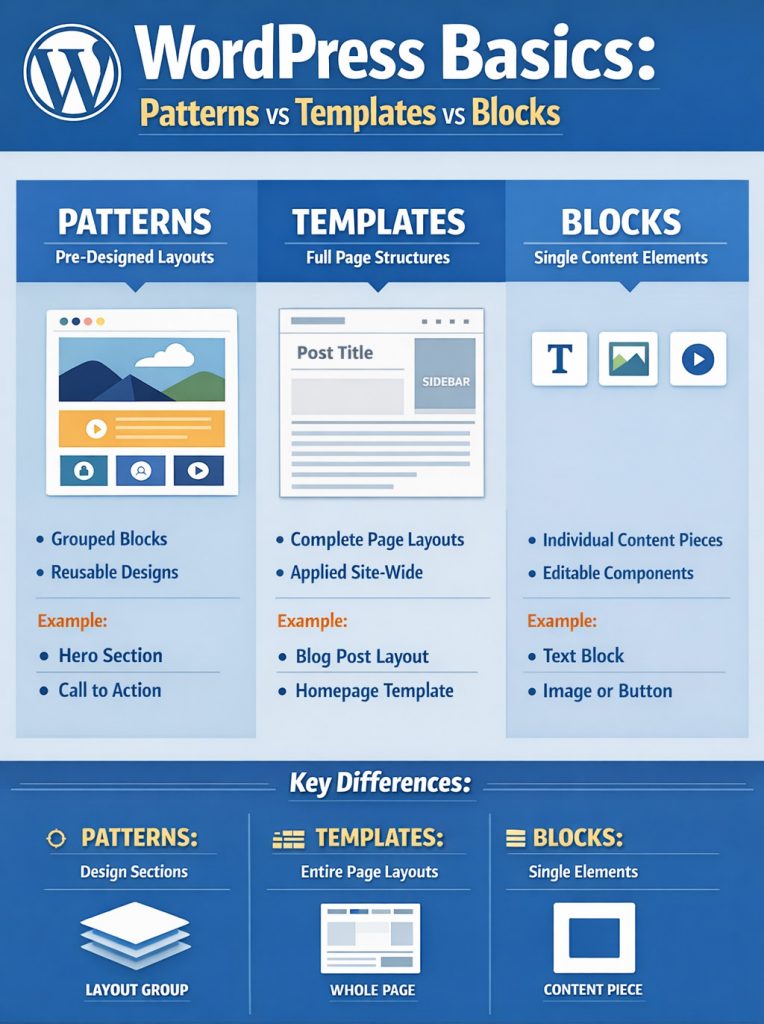
Over the past few years, WordPress has changed dramatically. What used to be a relatively straightforward website builder with pages, menus, and widgets has evolved into a far more complex system built around blocks, patterns, templates, and full-site editing.
Many hosting companies now offer AI-powered website builders that promise to create a complete website within minutes. While this sounds appealing, the reality can be very different once users begin editing their site.
For entrepreneurs without technical knowledge, particularly disabled entrepreneurs managing businesses independently, these systems can quickly become confusing, frustrating, and stressful.
In many cases, users only discover the complexity after they have purchased hosting, generated a site with AI, uploaded their content, and attempted to customise the layout.
Unfortunately, support teams often respond with a common phrase:
“You may need to hire a developer.”
For individuals who were encouraged to use AI builders specifically because they were told it would be easy, this can feel misleading.
Hosting providers should clearly disclose the limitations of AI-generated sites and the potential need for developer support before checkout, not after users are already committed.
What Has Changed in WordPress?

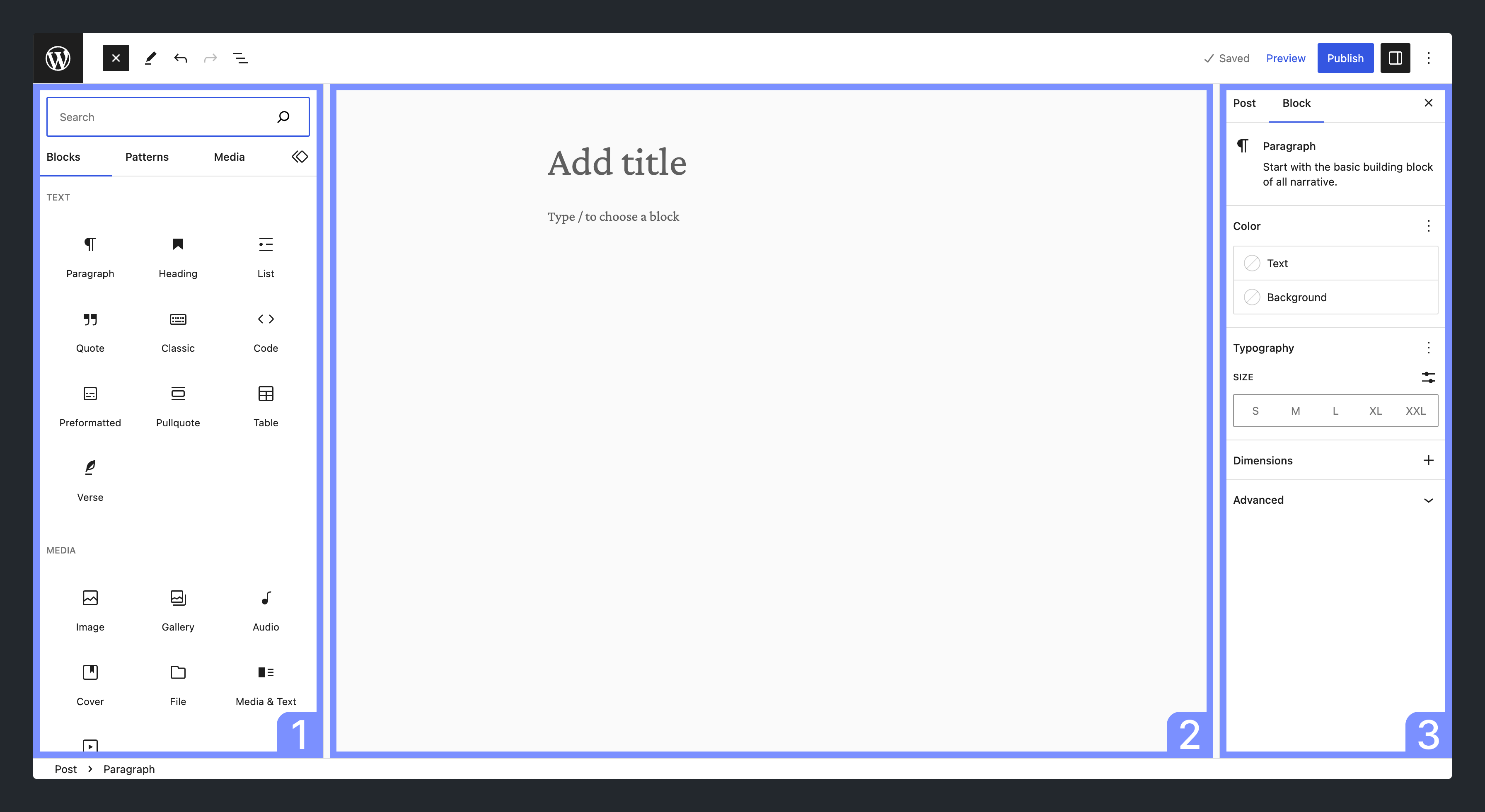

Modern WordPress uses something called Full Site Editing (FSE), which replaces many traditional tools.
Instead of simply editing a page, you are now editing parts of the entire website structure, including:
- Headers
- Footers
- Page templates
- Layout patterns
- Global styles
This system offers flexibility but can be overwhelming for beginners.
The Role of AI in Website Creation
Many hosting providers now offer AI onboarding tools.
The process usually works like this:
- You describe your business
- AI generates website pages
- It creates layouts using patterns and templates
- It builds menus automatically
- It populates placeholder text and images
At first glance, the website appears complete.
However, when users try to make changes, they may discover:
- Pages cannot easily be found
- Navigation menus are hidden
- Headers and footers cannot be edited from normal page settings
- Layout blocks are locked inside patterns
This is where frustration begins.
Why This Can Be Difficult for Disabled Entrepreneurs
Running a business while managing a disability already requires resilience, organisation, and energy.
When a platform advertises simplicity but delivers technical complexity, it can create unnecessary barriers.
Common challenges include:
- Cognitive overload when navigating unfamiliar systems
- Hidden menus or settings
- Lack of accessibility in documentation
- Technical terminology that is not explained
- Support teams are directing users to developers instead of offering guidance
For individuals working independently without a technical team, this can significantly slow down progress and affect well-being.
Key WordPress Terminology Explained
Understanding the terminology makes navigating WordPress much easier.
Blocks
Blocks are individual content elements such as:
- text
- images
- videos
- columns
- buttons
Every piece of content in WordPress is now built using blocks.
Patterns
Patterns are pre-designed layouts made from multiple blocks.
For example:
- Hero section with headline and image
- Call-to-action banner
- Testimonial section
- Pricing table layout
Patterns allow quick page building, but can be confusing if you do not know how to edit them.
Templates
Templates control the structure of entire pages.
Examples include:
- Homepage template
- Blog post template
- Archive template
- Page template
Editing a template can change multiple pages across the entire website.
Template Parts
Template parts are reusable sections used across the site.
Common examples include:
- Header
- Footer
- Sidebar
- Navigation bar
These often must be edited through the Site Editor, not the page editor.
Navigation Block
The navigation block controls your menu.
Unlike older WordPress versions, menus are now embedded in templates or headers.
This is why pages sometimes do not appear in the menu automatically.
Global Styles
Global styles control:
- colours
- typography
- spacing
- button styles
Changing global styles updates the design across the entire website.
Full Site Editing (FSE)
Full Site Editing allows users to modify all website areas visually, including headers and footers.
However, it also means that users must understand site architecture, not just page editing.
Finish Onboarding
Many AI builders include a step called Finish Onboarding.
This usually means:
- completing AI setup
- confirming design choices
- activating the theme
- enabling editing tools
Until onboarding is finished, some settings may remain hidden.
Why Pages May Not Appear in Navigation
This is one of the most common issues users encounter.
Possible reasons include:
- The navigation block was manually configured
- The page was not added to the menu
- The page is still in draft status
- The header template is locked
- The AI builder created a custom navigation structure
Users must edit the Navigation Block inside the Header Template, not just the page settings.
How to Edit Headers and Footers in Modern WordPress
Many users expect to edit headers through page settings, but this is no longer the case.
Follow these steps:
- Go to Dashboard
- Click Appearance
- Select Editor
- Choose Template Parts
- Open Header or Footer
- Edit the blocks
- Save changes
Changes will apply across the entire website.
Tutorial: Editing an AI-Generated WordPress Website
Step 1: Complete Onboarding
After AI generates your site:
- locate Finish Onboarding
- confirm theme activation
- review design settings
This unlocks editing tools.
Step 2: Review Pages
Navigate to:
Dashboard → Pages
Check:
- page titles
- page status
- visibility
Ensure important pages are published.
Step 3: Edit the Navigation Menu
Go to:
Appearance → Editor → Header
Select the Navigation Block.
Add or remove pages.
Save changes.
Step 4: Edit Layout Patterns
When editing a page:
- Click the section you want to modify
- Identify the pattern blocks
- Adjust text, images, or layout
- Unlock blocks if necessary
Some patterns may have restrictions applied.
Step 5: Adjust Global Styles
Go to:
Appearance → Editor → Styles
Here you can adjust:
- colours
- fonts
- button styles
- spacing
Step 6: Save Frequently
Always click Save after changes.
WordPress may ask whether changes apply to:
- page
- template
- template part
Read these prompts carefully.
Transparency and Consumer Expectations
AI website builders are marketed as simple tools for beginners.
However, when users encounter technical barriers and are then told to hire developers, this raises concerns about transparency.
A clear notice should ideally appear before hosting checkout, explaining:
- AI builders may require technical knowledge
- Some design elements may be difficult to modify
- Developer assistance may be required
This would allow customers to make informed purchasing decisions.
Practical Advice for Beginners
If you are new to WordPress:
Start with these steps.
- Choose beginner-friendly themes
- Avoid over-complicated AI layouts
- Learn the difference between pages and templates
- Keep navigation simple
- Document your changes
Taking a gradual approach reduces overwhelm.
Conclusion
WordPress remains one of the most powerful website platforms in the world, but its shift toward block-based full-site editing and AI-generated design has introduced complexity that many users do not expect.
For entrepreneurs, especially those managing disabilities, technology should empower, not frustrate.
Greater transparency from hosting providers and clearer explanations of WordPress terminology would help ensure that users are fully informed before they invest time, money, and energy into building their websites.
With the right guidance and understanding of patterns, templates, and navigation structures, users can regain control of their websites and continue building their online presence with confidence.
Further Reading & Resources
- https://www.ukwebsitedesigners.co.uk
- https://cms.verpex.com/assets/blog/wordpress-full-site-editing.webp
- https://i0.wp.com/raw.githubusercontent.com/WordPress/gutenberg/trunk/docs/assets/overview-block-editor-2023.png?ssl=1
- https://wordpress.org/documentation/files/2023/08/patterns.png
- Learn WordPress – There’s always more to learn | Learn WordPress
- WordPress Tutorial – GeeksforGeeks
- WordPress Tutorial


Renata The Editor of DisabledEntrepreneur.uk - DisabilityUK.co.uk - DisabilityUK.org - CMJUK.com Online Journals, suffers From OCD, Cerebellar Atrophy & Rheumatoid Arthritis. She is an Entrepreneur & Published Author, she writes content on a range of topics, including politics, current affairs, health and business. She is an advocate for Mental Health, Human Rights & Disability Discrimination.
She has embarked on studying a Bachelor of Law Degree with the goal of being a human rights lawyer.
Whilst her disabilities can be challenging she has adapted her life around her health and documents her journey online.
Disabled Entrepreneur - Disability UK Online Journal Working in Conjunction With CMJUK.com Offers Digital Marketing, Content Writing, Website Creation, SEO, and Domain Brokering.
Disabled Entrepreneur - Disability UK is an open platform that invites contributors to write articles and serves as a dynamic marketplace where a diverse range of talents and offerings can converge. This platform acts as a collaborative space where individuals or businesses can share their expertise, creativity, and products with a broader audience.